How to Order Food Delivery in Seoul as a Tourist (Using Baemin’s English App)
Ordering food delivery in Seoul used to be one of those things tourists quietly gave up on. Korean-only apps, address confusion, payment issues, and awkward phone calls made it feel impossible unless you lived here. That has finally changed.
With the English version of Baemin (short for Baedal Minjok), tourists can now order food delivery in Seoul almost as easily as locals. You can browse restaurants, order Korean food, track your rider, and pay with a foreign card, all inside the app.
This guide walks you through the exact step-by-step process, from entering your hotel address to completing payment, so you can confidently order delivery during your stay in Korea.
Why Baemin Is the Best Delivery App for Tourists in Seoul
Baemin is Korea’s most widely used food delivery app. Unlike smaller platforms, it covers almost every neighborhood in Seoul and partners with a massive range of restaurants, from fried chicken and Korean BBQ to cafes and convenience food.
What makes Baemin especially useful for tourists now is:
An official English interface
Clear delivery instructions
Multiple delivery speed options
Global payment support for foreign credit cards
If you’re staying in a hotel, serviced apartment, Airbnb, or guesthouse, Baemin is the easiest way to experience Korean food without leaving your room.
Step 1: Input Your Address (Hotel or Accommodation)
After installing Baemin and switching the app language to English, the first thing you’ll do is set your delivery address.
This is where many tourists worry, but Baemin makes it surprisingly straightforward.
You can:
Search by hotel name
Enter the full address
Pin your location on the map
If you’re staying at a hotel, using the hotel name usually works best. For Airbnbs, copy the Korean address provided by your host and paste it into the search bar.
Tip:
Make sure your address is as precise as possible. If your building has a front desk or security desk, deliveries are much smoother.
Step 2: Select a Store You Prefer
Once your address is set, Baemin automatically shows restaurants that deliver to your location.
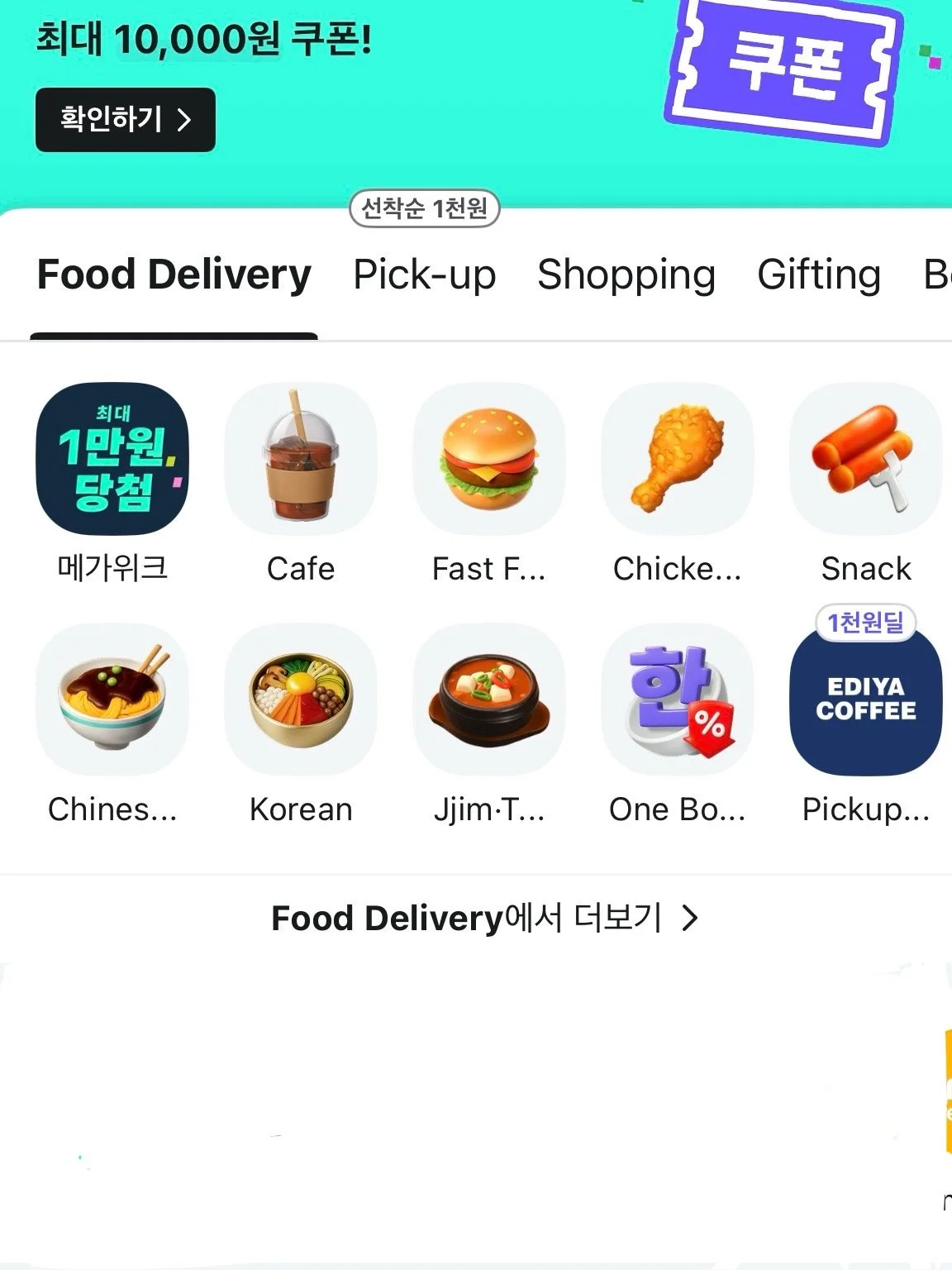
You’ll see categories like:
Korean food
Chicken
Fast food
Cafe
Chinese
Snacks
Each store listing shows:
Estimated delivery time
Delivery fee
Minimum order amount
Customer ratings
This helps you quickly compare options without guessing. Restaurants that deliver frequently tend to be well-optimized for the app, meaning fewer delays and smoother handoffs.
Step 3: Select Your Menu and Add Items to Cart
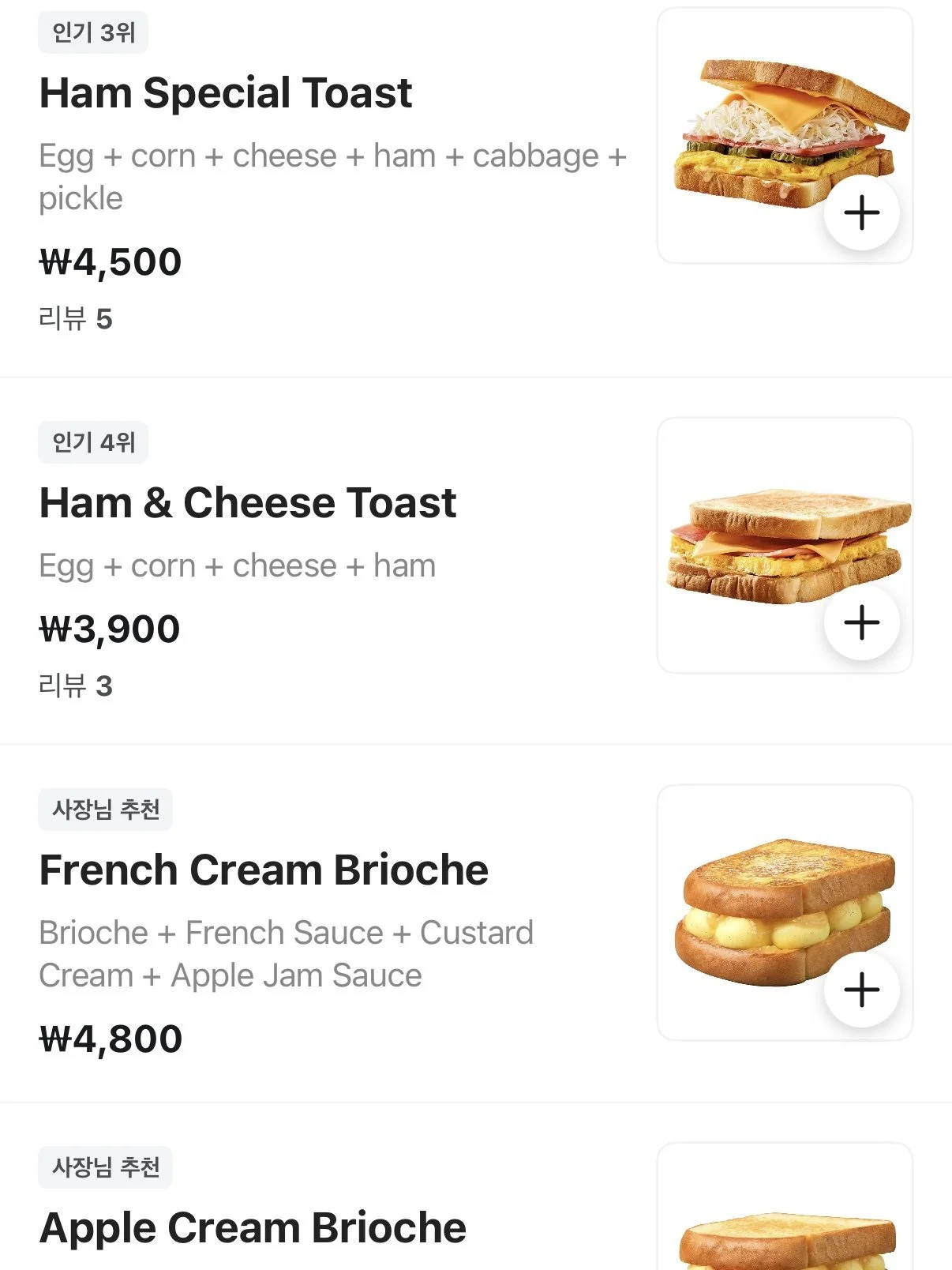
After choosing a restaurant, you’ll enter the menu page. This is where Baemin’s English version really helps.
Menus are translated clearly, and most items include photos. You can:
Choose portion sizes
Select spice levels (when available)
Add side dishes
Add notes if the store allows requests
Once selected, add everything to your cart. The app automatically calculates:
Food total
Delivery fee
Discounts or coupons (if available)
No surprises at checkout.
Step 4: Select Your Delivery Method
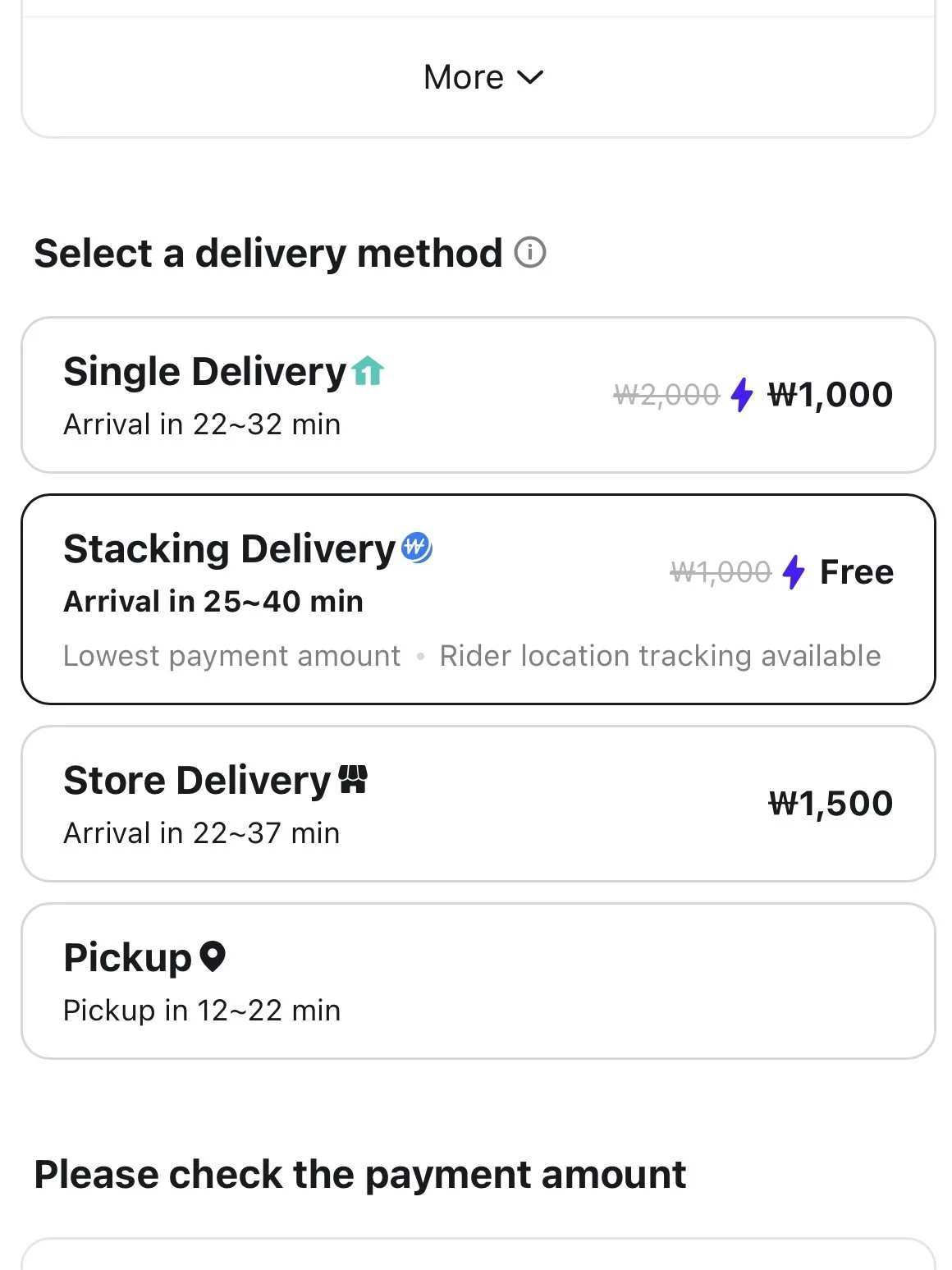
Baemin offers multiple delivery modes, which is something tourists often don’t realize.
Common options include:
Single Delivery
Faster delivery
Slightly higher fee
Your order goes directly from the restaurant to you
Stacking Delivery
Slower but cheaper or free
Your order is grouped with others nearby
Rider tracking is still available
Store Delivery
Handled by the restaurant
Fees vary depending on store
Pickup
You walk to collect the food yourself
Useful if delivery fees are high or you’re nearby
For tourists, Stacking Delivery is often the best value if you’re not in a rush.
Step 5: Check Your Details Carefully
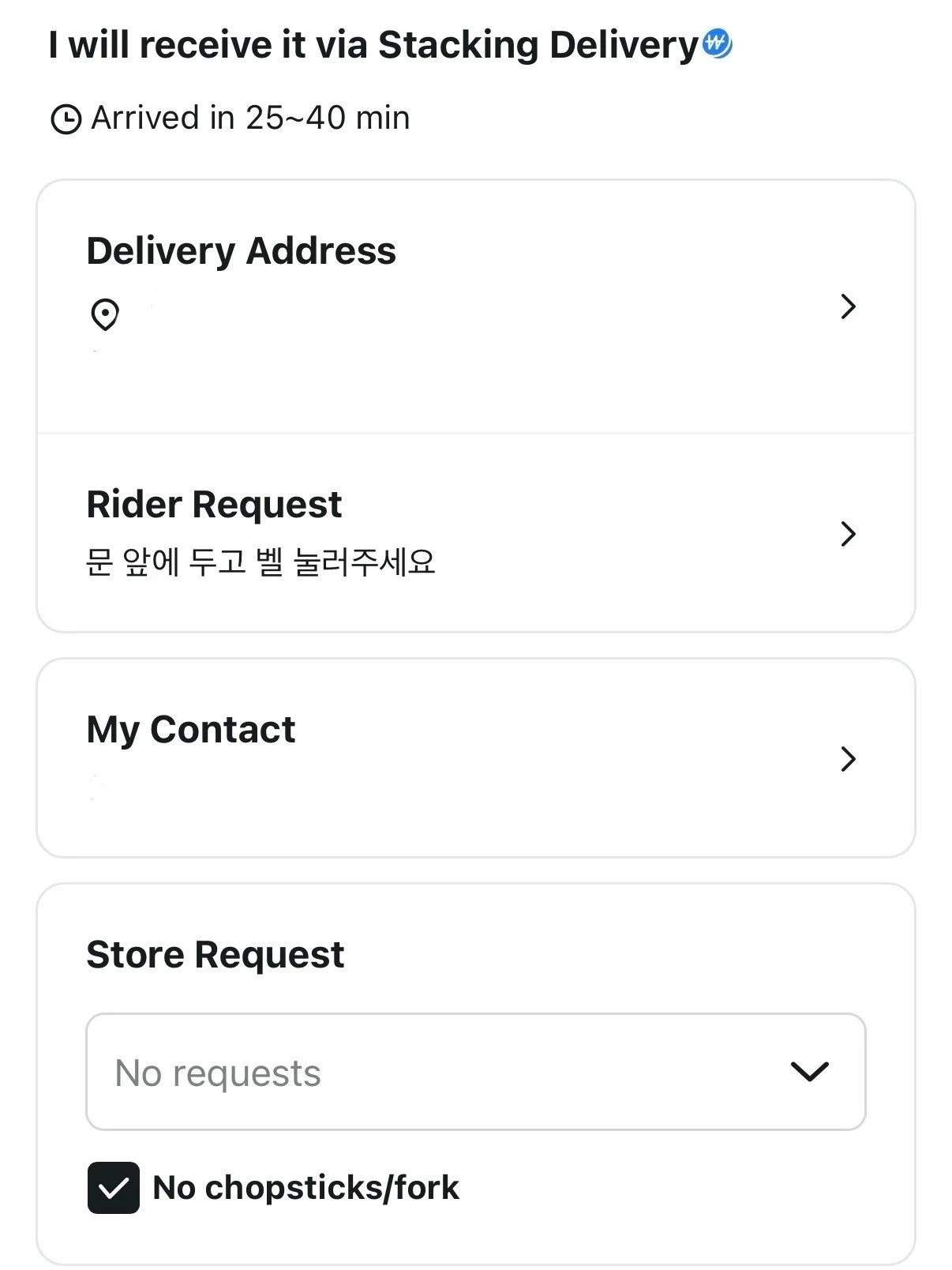
Before payment, Baemin shows a final confirmation screen. This step is important, especially if you don’t speak Korean.
Double-check:
Delivery address
Contact number
Rider request
Store request
Rider Request
This is where you can leave instructions like:
“Leave at front desk”
“Call upon arrival”
“Leave at door”
Even if written in English, most riders understand basic delivery instructions.
Store Request
This is for food-related requests, such as:
No utensils
Less spicy
Extra napkins
If you don’t need anything special, you can leave this blank.
Step 6: Select Global Payment and Pay with a Foreign Card
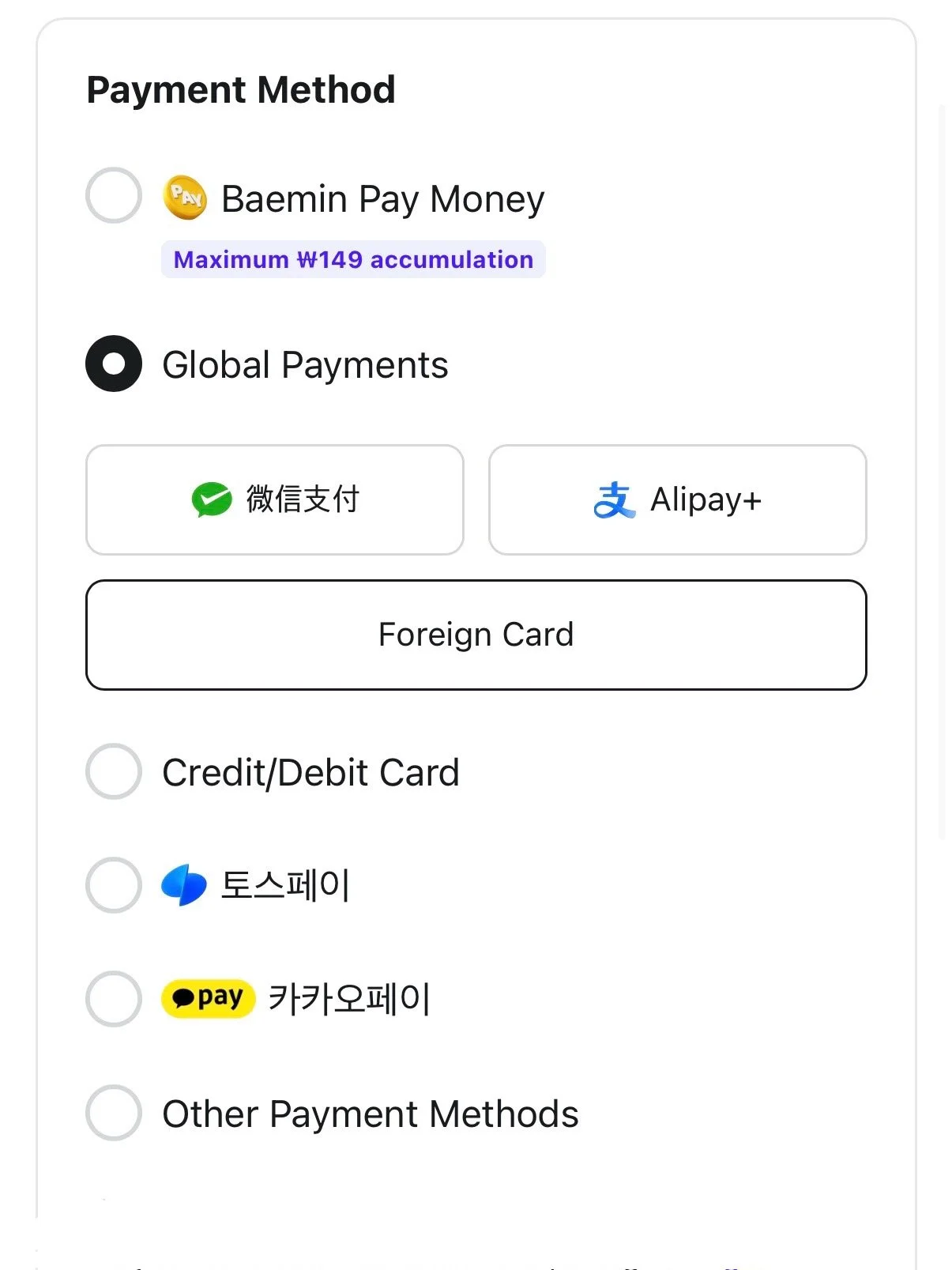
This is the step that used to stop tourists completely. Not anymore.
Baemin now supports global payment, allowing you to pay with:
International credit cards
Foreign-issued debit cards
You simply select the global payment option, enter your card details, and complete payment like any other international app.
No Korean bank account required. No cash on delivery. No phone calls.
What Happens After You Order
Once payment is complete:
The restaurant confirms your order
A rider is assigned
You can track delivery in real time
Baemin shows:
Estimated arrival time
Rider movement
Order status updates
When the rider arrives, they’ll usually:
Call your phone
Leave the food at the front desk
Leave it at the door if requested
Hotel staff in Seoul are generally very familiar with food deliveries and can assist if needed.
Common Tips for Tourists Using Baemin
Order slightly earlier during dinner hours (6–8 pm)
Don’t panic if delivery times change slightly
Use hotel front desks whenever possible
Screenshots help if language becomes an issue
Baemin is designed for real-life use, not perfection. Small delays are normal, but orders almost always arrive.
Why Food Delivery Is Worth Trying in Seoul
Food delivery is deeply embedded in Korean daily life. Many restaurants are optimized for delivery, sometimes even more than dine-in. Portions are generous, packaging is careful, and prices are reasonable compared to eating out every night.
For tourists, delivery is especially useful when:
You’re tired from walking
Weather is bad
Restaurants are full
You want to try local chains not tourist-oriented
Using Baemin lets you eat like locals do, without language stress.
Final Thoughts
With Baemin’s English version and global payment support, ordering food delivery in Seoul is no longer intimidating for tourists. From entering your hotel address to paying with a foreign card, the process is now simple, logical, and reliable.
If you’re visiting Seoul and staying more than a day or two, using Baemin at least once is worth it. It saves time, energy, and opens up a whole side of Korean food culture that many tourists used to miss entirely.
